Does iPhone 13 Have Wireless Charging? A Comprehensive Guide
author: Trusda
2024-03-01
Introduction:
The iPhone 13, a technological marvel from Apple, embodies the epitome of smartphone innovation. Among its many remarkable features, wireless charging takes center stage, seamlessly integrating convenience and efficiency into our lives.
This article aims to provide a comprehensive guide on enabling wireless charging on your iPhone 13, selecting the perfect wireless charger for your device, and expert recommendations on the best wireless charging solutions available.
Furthermore, we will share valuable insights and tips to enhance your wireless charging experience, ensuring your iPhone 13 stays adequately powered for your daily needs.
Does iPhone 13 Support Wireless Charging?
The iPhone 13 embraces the convenience of both MagSafe and Qi wireless charging. In a significant milestone in late 2023, Apple unveiled the iOS 17.2 RC update, offering developers and public beta users an exciting enhancement. This update introduced a crucial feature for iPhone 13 and iPhone 14 users, enabling seamless support for Qi2 wireless charging.
Enabling Wireless Charging on iPhone 13:
Enabling wireless charging on your iPhone 13 is a simple and user-friendly process. Follow these steps to get started:
Choose a Compatible Charger:
Select a wireless charger that supports MagSafe, Qi, and Qi2 wireless charging for optimal compatibility with your iPhone 13.
Proper Placement:
Ensure proper magnetic alignment by placing your iPhone 13 on the charging pad or stand. Align the device's charging coil with the corresponding area on the wireless charger.
Power Connection:
Connect the wireless charger to a power outlet to initiate the charging process.
Charging Initiation:
Once your iPhone 13 is correctly positioned on the charging pad and the charger is plugged in, the device will automatically begin charging.
Indicator Confirmation:
Check for the charging indicator on your iPhone 13's screen to verify that wireless charging has been initiated. You may also receive auditory or visual notifications if enabled.
Optimize Placement:
For an optimal user experience, ensure no obstructions between your iPhone 13 and the charging pad. Consider removing any protective cases that may interfere with the wireless charging connection.
Considerations for Choosing Wireless Chargers for iPhone 13:
When selecting a wireless charger for your iPhone 13, several factors contribute to a seamless and efficient charging experience:
Compatibility and Certification:
Opt for a Qi/Qi 2-certified charger that meets universal wireless charging standards. Also, choose Apple MFi-certified chargers, ensuring compatibility and safety.
Design and Quality:
Consider the design that suits your needs, whether it's a charging pad, stand, or multi-device station. Look for chargers made from high-quality materials, offering durability and a non-slip surface to prevent your iPhone 13 from sliding off.
Key Features to Consider:
When selecting a wireless charger, it's important to ensure compatibility with your case, especially if you have a thicker one. Seek out chargers equipped with LED indicators that provide clear charging status updates, while being mindful of their brightness, particularly for bedroom use. Prioritize chargers with safety features such as overheating protection, which safeguard both your iPhone 13 and the charger from any potential harm.
Brand Reputation and Reviews:
Choose wireless chargers from reputable brands known for their quality and reliability in wireless charging technology. Reading reviews and ratings can provide valuable insights into user experiences and product reliability.
Best Wireless Chargers for iPhone 13:
Trusda offers the ultimate convenience with its top-of-the-line wireless charger designed specifically for the iPhone 13. Experience an enhanced charging experience with its innovative and stylish design, ensuring your devices stay effortlessly charged.
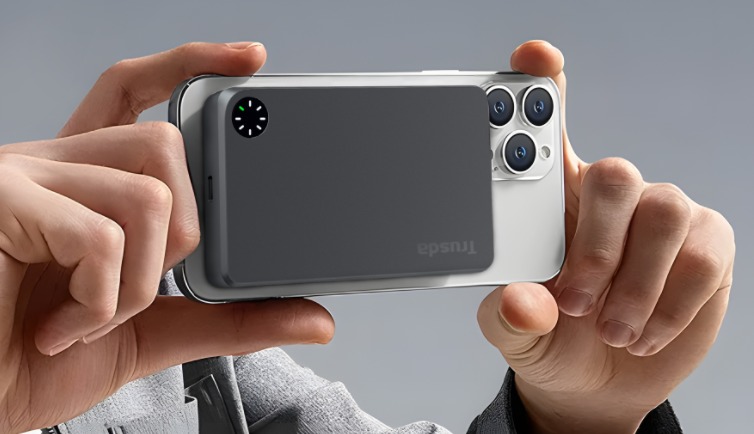
Discover the cutting-edge UC02, Our latest Qi wireless charging portable power bank with a sleek appearance and a capacity of 5000mAh.
For Qi2 wireless charging, explore the UC02.M with a stylish ring LED design. With its portable size, embrace Qi 2 charging at the forefront of technology.
Conclusion:
With the iPhone 13's wireless charging capabilities, you can enjoy the convenience of a tangle-free charging experience. By following the steps to enable wireless charging, considering important factors when choosing a wireless charger, and exploring Trusda's top wireless charging solutions, you can optimize your iPhone 13's charging efficiency and seamlessly integrate wireless charging into your daily routine.
Solution: Why Is My Power Bank Blinking But Not Charging?
What is Qi2?
Related Article

Learn what a semi-solid power bank is, why semi-solid-state battery technology matters in 2026, and how to choose a safer, longer-lasting portable charger.
Semi-Solid Power Bank Guide 2026: Safer Charging, Longer Battery Life, and What to Check Before Buying

Will power banks explode? While it's not a common occurrence, it's crucial to understand how to use them correctly. Dive into this article to uncover everything you need to know about power bank explosions.
Safety Guide: Are you worried about the explosion of power bank?